Raspberry Pi 4B Guix System Network Boot
Configuration Management with Guix
I've been working on a project involving Near-Field Communication (NFC). Most of the software is written in Clojure, along with some C and ARM Assembly. The application environment is a Raspberry Pi (4b) and an STM32 interfacing with a PN532 and PN5180. Guix is being used to build and manage the configuration of the environment.
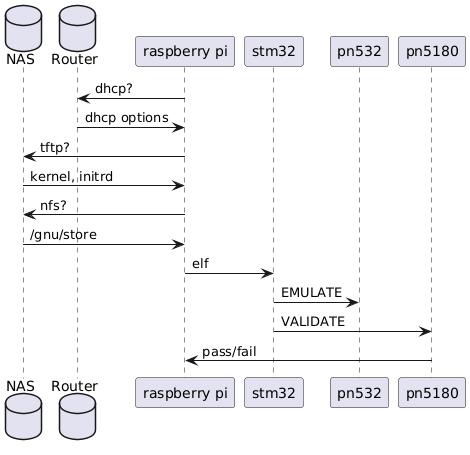
The PN532 emulates various types of ISO/IEC 14443 devices, and the PN5180 reads the emulated data. The STM32 coordinates with these devices via I2C/SPI, and the Pi provides a tiny environment for building and deploying code to the STM32.
Initially, the application environment was highly constrained and consisted of a pi cluster with no microSD cards or attached storage. Additionally, the only means of interfacing with the Pis was over UART via their GPIO pins. The Restrictions no longer exist, but I found the process of building a Guix system for this setting interesting, so I figure I'd go over the setup for posterity.
note about Guix
Guix is a GNU Project, and as such, it is built with the Linux-libre, a variant of the Linux kernel free from all proprietary binary blobs. Due to this, certain devices will not work with it (e.g. a Raspberry Pi using a broadcom chip-set).
The nonguix channel provides packages that are unavailable in official channels
due to their conflicting values. This channel can be used to build non-free Guix
systems (hence nonguix). Discussion of nonguix is prohibited in official guix
correspondence. Consider this post anathema.
Building and the System
The storage server builds the kernel, initrd, and /gnu/store and places them
in an TFTP/NFS share. The Linux kernel will happily mount an NFS share, but the
Raspberry Pi firmware is only capable of using tftp, so both methods are used to
share the same directory (/mnt/storage).
guix system init --no-bootloader --system=aarch64-linux rpi-pxe.scm /mnt/storage
The kernel image and initrd are served with atftpd. In a simpler network
topology the built-in tftp server provided by dnsmasq may be good enough, but in
my case it struggled with packet loss.
(define atftpd-service
  (shepherd-service
   (provision '(tftp atftpd))
   (requirement '(networking zfs-import))
   (start #~(make-forkexec-constructor
             (list #$(file-append atftp "/sbin/atftpd")
                   "--daemon"
                   "--no-fork"
                   "--no-multicast"
                   "--verbose=5"
                   "--logfile" "/var/log/atftpd.shepherd.log"
                   "/mnt/storage")))
   (stop #~(make-kill-destructor))))
Rasbperry Pi Configuration Files
Firmware files for the various Raspberry Pi models can be found in this repository. Had a microSD card been an option to me at the time, I would have made use of this blob-free firmware distribution, or u-boot. In my case, any free space I could spare took priority.
config.txt
arm_64bit=1
enable_uart=1
uart_2ndstage=1
dtoverlay=disable-bt
kernel=Image
initramfs initrd followkernel
device_tree=bcm2711-rpi-4-b.dtb
Guix Configuration
Kernel Configuration
The kernel is built from the downstream kernel source provided by the Raspberry Pi foundation. This variant of the kernel is heavily patched to make it work with all of the devices on-board the Raspberry Pi. That of course means proprietary binary blobs are a part of the picture.
(define-public linux-raspberrypi
  (package
    (inherit linux)
    (name "linux-raspberrypi")
    (version "6.18.y")
    (source
     (origin
       (method git-fetch)
       (uri (git-reference
             (url "https://github.com/raspberrypi/linux")
             (commit "f3ee12aca79d77b3e6708b85ca04bb1deb1f973b")))
       (file-name (git-file-name name version))
       (sha256
        (base32 "0maqwwr2ndm4d1wxmm8k0qx5xrgprggxkfz107f83iw1m03xcg4s"))))
    (synopsis "Official Raspberry Pi Linux Kernel")
    (description "Downstream kernel built by the Raspberry Pi foundation.")))
Since the environment is very particular, the kernel is built with some additional configuration:
- The Pis relied on DHCP for their ip, hostname, and tftp server location
(
CONFIG_PI_PNP,CONFIG_IP_PNP_DHCP) - The Pi kernel needs the ability to attach an NFS mount to itself. I allowed
multiple versions of NFS simply because I didn't want to fight with permission
issues. (
CONFIG_NFS_V*) - Since the NFS root is read-only, the kernel needs the ability to store state
in an overlay (
CONFIG_OVERLAY_FS) - In the near future M.2 SATA SSDs attached via USB3.0 would be made available
(
CONFIG_USB*,CONFIG_BLK_DEV_SD,CONFIG_SCSI).
(define-public linux-raspberrypi-net
  (customize-linux
   #:name "linux-raspberrypi-net"
   #:linux linux-raspberrypi
   #:defconfig "bcm2711_defconfig"
   #:configs
   '("CONFIG_IP_PNP=y"
     "CONFIG_IP_PNP_DHCP=y"
     "CONFIG_ROOT_NFS=y"
     "CONFIG_NFS_FS=y"
     "CONFIG_NFS_V3=y"
     "CONFIG_NFS_V4=y"
     "CONFIG_NFS_V4_1=y"
     "CONFIG_NFS_V4_2=y"
     "CONFIG_OVERLAY_FS=y"
     "CONFIG_USB_UAS=y"
     "CONFIG_USB_STORAGE=y"
     "CONFIG_BLK_DEV_SD=y"
     "CONFIG_SCSI=y"
     "CONFIG_USB_XHCI_HCD=y"
     "CONFIG_USB_XHCI_PCI=y"
     "CONFIG_USB_XHCI_PLATFORM=y")))
...
    (kernel-arguments
     '("earlycon=pl011,0xfe201000"
       "console=ttyAMA0,115200"
       "loglevel=7"
       "ip=dhcp"
       "genet.force_reneg=y"
       "modprobe.blacklist=brcmfmac,brcmutil"
       "ro"
       "rootwait"
       "--"
       "--volatile-root"))
The earlycon parameter is telling the kernel which serial driver to use,
and where it's address in memory resides. The genet.force_reneg=y tells the
Broadcom GENET ethernet driver to renegotiate it's connection, which was added
after I found that the Pi struggled to stay on the network after switching from
the firmware to the kernel. Bluetooth is disabled simply because other
peripherals were occupying the GPIO pins affected by those drivers.
File System
Here is a snippet of the configuration from the storage server. The Pi mounts
/storage as /mnt is configured with fsid=0.
(service nfs-service-type
         (nfs-configuration
          (idmap-domain "localdomain")
          (nfs-versions '("4.2" "4.1" "4.0" "3"))
          (nfsd-udp? #t)
          (exports
           '(("/mnt" "192.168.0.0/16(rw,insecure,sync,no_subtree_check,crossmnt,fsid=0)")
             ...
             ("/mnt/storage" "192.168.0.0/16(ro,insecure,sync,no_subtree_check,no_root_squash)")))))
Since the guix system built on the NAS was stored at /mnt/storage, when a Pi
mounted this directory as it's root (/), the /gnu/store became available.
I'm included extra information here to help the Pi easily find and connect to
the NAS, but in better network conditions the extra options aren't needed.
(file-systems
 (list (file-system
        (mount-point "/")
        (device "192.168.3.2:/storage")
        (type "nfs")
        (options "vers=4.2,ro,tcp,hard,nolock,timeo=600,retrans=5,nconnect=4,addr=192.168.3.2")
        (check? #f))

        %pseudo-terminal-file-system
            %immutable-store))
Serial Console Connection
All of the Pis were attached via UART to a waveshare device that makes them
accessible via a serial connection. This agetty configuration ensures the
service presents the same kind of connection that was originally passed to the
kernel.
(modify-services %base-services
                 (delete static-networking-service-type)
                 (agetty-service-type
                  config =>
                  (agetty-configuration
                   (inherit config)
                   (tty "ttyAMA0")
                   (baud-rate "115200")
                   (term "vt100")
                   (flow-control? #t)
                   (extra-options '("-L")))))))
Parting Thoughts
While the project itself is very interesting, the experience of building a kernel for the Raspberry Pi has soured me on the platform. Left out of this post are the many hurdles I had to jupm over to arrive at a working environment.
For anyone considering Guix for embedded development my input would be this: Guix is incredible for embedded development, and there are single-board computers out there that are much more deserving of its presence. Given the option, I would replace the Raspberry Pi 4B's in this project with an Olimex, or BeagleBoard device.
Full Configuration
A copy of the full configuration can be found here.